
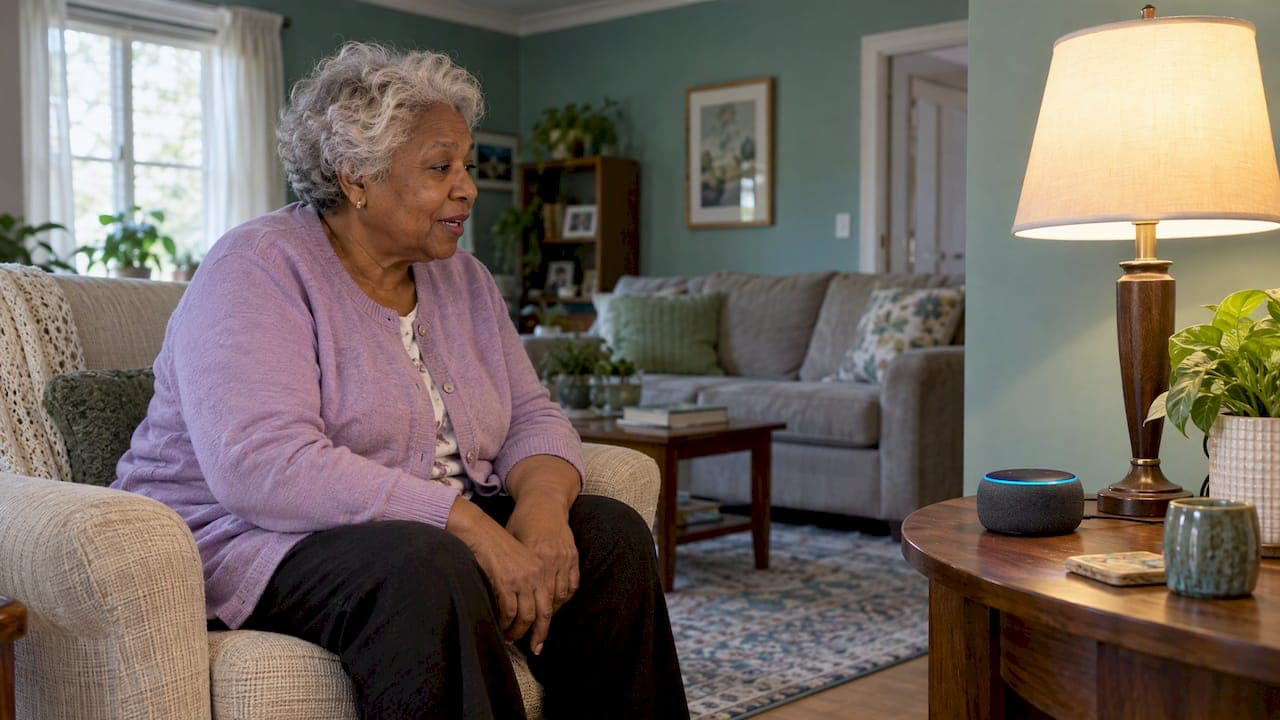
The best smart home setup for a senior is a small one: a few devices that solve one real problem each, chosen with your parent, and backed by regular human check-ins. Start with voice-controlled lighting, a way to call for help, and a simple sensor or alert that fits the way your parent actually lives. Add more only when a need shows up.
If you are reading this, you may have noticed a subtle sense that something has shifted at your parent's house. Maybe the stove gets left on, the stairs are dim at night, or you simply wish you could know they are okay without calling three times a day. Technology can help with all of that. It can also become one more overwhelming thing to manage. This guide is meant to keep it simple.
TL;DR
- Smart home tools work best as a supplement to human care, filling gaps when you cannot be there. They do not replace check-ins.
- Pick devices by the person, the task, the room and their preferences, not by a "top 10" list.
- Talk with your parent before you buy anything. Poor adoption usually comes from a mismatch between the device and what the person values.
- Start with lighting, voice control, an emergency option and one simple sensor. Think through privacy, Wi-Fi and power outages before you install.
- Your parent's comfort and dignity are the real measure of whether a setup is working.
Table of Contents
- What smart home technology can do for an older adult
- Start with the person, not the product
- Devices that make everyday tasks easier
- Home safety features and what alerts can really tell you
- Talking with your parent first
- Privacy, Wi-Fi, power and reliability
- A simple way to begin
- Our perspective
- Want a second set of eyes on the house?
- FAQ
- Sources
What smart home technology can do for an older adult
Researchers who review this field describe a fairly broad list of benefits. A 2024 review of smart home technologies for older adults found they can support daily monitoring, help with everyday activities, provide reminders, improve functional abilities and even offer a sense of companionship. The same review notes they can increase independence and reduce the burden on family caregivers.
Another 2024 systematic review sorts these tools into six groups: physiological monitoring, functional monitoring, safety monitoring and assistance, security monitoring and assistance, social interaction support, and cognitive and sensory assistance. That sounds clinical, but in real life it looks like this:
- A light that turns on when your mother says so, instead of her crossing a dark room to find a switch.
- A doorbell camera that lets your dad see who is outside before he gets up.
- A reminder that speaks aloud when it is time for an appointment.
- A video call button that works without hunting for a phone.
The important framing comes from the consumer testers at Wirecutter, who say technology works best as a supplement to human care, not a replacement. It fills the gaps when you or another caregiver cannot be present. The Alzheimer's Association makes a similar point: even with good technology in place, the most important part of safety is pairing it with regular human check-ins.
That is a hopeful way to see it. You are not trying to build a surveillance system. You are trying to make an ordinary day a little smoother and your own worry a little lighter.
Start with the person, not the product
Before you open a shopping page, spend a few minutes on four questions. They come from assistive technology guidance that suggests choosing based on the person, the task, the environment and their preferences, and it adds that there is no single "best" device.
- What is the actual problem? "Mom might fall in the night" is a different problem from "Dad forgets his afternoon medication." Each has a different answer.
- Where does it happen? The bathroom, the hallway to the bedroom and the kitchen are common spots. Technology should sit where the need is.
- What can your parent comfortably use? Some people love talking to a speaker. Others find it strange and would rather press a button.
- Who will keep it working? Batteries, updates and Wi-Fi passwords need an owner. If that is you, be honest about how much you can take on.
The 2024 systematic review of gerontechnologies recommends involving the older adult in choosing the solution, making sure it is easy to use, and providing thorough training. The authors also note that poor adoption often comes from a gap between what a device does and what the person actually values. A gadget that solves your worry but not their problem tends to end up in a drawer.
A real-life example
Imagine a mother in her late 80s who lives alone and is steady on her feet but dislikes bright overhead lights at night. Her daughter is tempted to install cameras. After a conversation, they choose something different: motion-activated night lighting along the hallway and a voice assistant in the bedroom that can place a call. Mom keeps her privacy, the daughter gets a way to be reached, and nobody feels watched. The best setups often look this modest.

Devices that make everyday tasks easier
Wirecutter's testers list common devices such as smart window shades, light bulbs, security cameras, pill dispensers and smoke alarms. Here is how to think about the most useful categories.
Voice assistants and routines
Voice control is often the easiest first step because it removes the need to find a switch or a remote. Amazon describes how its assistant can control multiple compatible devices by voice and set up routines, covering things like lights, cameras and thermostats. A routine might be as simple as saying "good night" to turn off the lamps and lock a compatible door.
Google's platform works similarly. Its Home app brings compatible devices together in one place, and Google says it works with more than 80,000 compatible devices. Its speaker with Gemini was listed at $99.99 in the US, and the optional Google Home Premium plan was listed at $10 a month or $100 a year. Prices change, so check the current listing before you decide.
If your parent already uses one ecosystem, stay with it. Switching creates one more thing to learn.
Lighting
Good lighting is one of the most practical safety upgrades, and it is also the least intimidating. Wirecutter notes that smart bulbs are an easier, less permanent alternative to smart switches, with one catch: the wall switch has to stay on for the bulb to work. If your parent habitually flips switches off, tape a small note over the switch or choose a smart switch instead.
Reminders
Customizable spoken reminders can help with medication, appointments and other daily tasks. Wirecutter describes one older woman for whom they were a real breakthrough. Reminders are a convenience, not a medical tool. For anything about medications or health conditions, talk with your parent's doctor or pharmacist about what routine is right.
Hearing and sensory support
UCLA Health notes that smart technology can translate household sounds like doorbells, kitchen timers and ringing phones into a physical sensation for people with hearing loss. If your parent misses the doorbell or the oven timer, this is worth exploring.
Dementia-related considerations
The Alzheimer's Association says tools such as lighting and temperature controls, leak alerts, alarms, doorbell cameras, smart locks and smart appliances can help maintain routines and support independence for someone living with dementia. Pennsylvania's Department of Aging adds that some people with dementia may have difficulty adjusting to new devices, so go slowly and watch how your parent responds. Questions about memory belong with their doctor.
Home safety features and what alerts can really tell you
Sensors are the quiet workhorses of a connected home. A 2024 scoping review found the most common ones are motion sensors for activity, contact sensors for doors and windows, and pressure sensors for chairs, beds and floors.
It helps to be realistic about what they tell you:
| Device type | What it can tell you | What it cannot tell you |
|---|---|---|
| Motion sensor | Whether there has been movement in a room or hallway | Why there was no movement, or whether someone is okay |
| Door or window contact sensor | That a door opened or closed | Who opened it, or why |
| Pressure mat or chair/bed sensor | Whether someone is in or out of bed or a chair | How someone is feeling |
| Smoke, CO or leak alert | A hazard in the home, sent to your phone | Anything about your parent's wellbeing |
| Doorbell or indoor camera | A live picture of one spot | What is happening anywhere else, and it raises privacy questions |
An alert is a prompt to check in, not a verdict. A quiet morning might mean a lazy morning. That is why a phone call after an alert, rather than panic, is the right response. If you are weighing sensors against cameras, our guide to motion sensors vs cameras for aging parents walks through it, and our overview of home safety devices for aging parents covers the wider range.
A way to call for help
Some families want an emergency option layered on top of everyday devices. As one example, Amazon's US listing for an Echo Show 5 bundle with Alexa Emergency Assist described 24/7 access to trained professionals, emergency-contact notification and alerts for detected smoke or CO alarms or breaking glass. It was listed at $105.98, and the subscription auto-renews monthly. Read the terms for any service like this, and test it with your parent so they know exactly what happens when they use it.
Falls deserve a mention too. Technology can alert someone after the fact, but strength and balance are what help prevent them. Gentle balance training for seniors is one way to work on that side of the picture, and it pairs naturally with good lighting and a clear path to the bathroom.
Talking with your parent first
This is the step families most often skip, and it matters most. Pennsylvania's Department of Aging advises that before buying a device, you have a conversation to make sure the older adult is comfortable and willing to try it.
There is a real emotional layer here. The AgeTech Collaborative's 2024 report found that participants said failed attempts with technology can make them feel old, and that learning something new can feel like a risk to their self-image. When you suggest a device, your parent may hear "you can't manage anymore." It helps to say what is true: you want to keep them in their home, and you want to worry less.
Some phrases that tend to land softly:
- "I would love to try this for the hallway light. Would you be willing to test it for two weeks?"
- "What part of your day feels the most annoying right now?"
- "You decide where it goes and what it does. I just want to help set it up."
Notice the shape: a trial, a question and a choice. This journey is not about taking control. It is about walking alongside your parent. Our guide on talking with aging parents about care has more ideas for starting these conversations.
Privacy, Wi-Fi, power and reliability
Privacy and boundaries
The same AgeTech Collaborative report found that both caregivers and older adults often struggle to define what information should be shared, which reflects a real tension between safety and personal privacy. Participants also worried that data could be used against them, for example to deny insurance coverage or raise premiums.
Practical ways to respect that tension:
- Agree together on who sees alerts and what they will do with them.
- Avoid cameras in bedrooms and bathrooms.
- Choose devices with clear controls. Google's speaker page, for example, describes a physical microphone mute switch.
- Write the agreement down, even in one paragraph, and revisit it every few months.
Smart utility meters sometimes raise questions too. A University of Illinois consumer guide explains that they transmit energy consumption data for billing and troubleshooting but do not share personal identifiers like names or Social Security numbers. If your parent is concerned, the guide suggests contacting the utility directly about its privacy policies.
Internet and power
Most smart devices depend on home Wi-Fi. Before you install anything, check three things:
- Is the Wi-Fi signal strong in the rooms where devices will live?
- Do you know the router's location and password, and can your parent restart it if needed?
- What happens during a power or internet outage? Keep a plain landline or charged mobile phone, flashlights and a printed list of emergency numbers, so nothing important depends on a screen.
The point of a backup is that the house stays safe even when the technology is not working.
Keeping it working
Set a calendar reminder every few months to test alerts, replace batteries and make sure the app still works on your phone. Thorough training matters too: do a walkthrough together and leave a one-page cheat sheet by the speaker in large print.
A simple way to begin
Here is a gentle sequence many families find manageable:
- Week one: Walk through the home with your parent and note where they feel unsure or uncomfortable. Our home safety guide for aging parents helps you know where to start.
- Week two: Add lighting for the path from bedroom to bathroom.
- Weeks three and four: Introduce a voice assistant for lights and calls, if your parent is open to it.
- Month two: Consider one sensor or alert for the biggest remaining worry, and agree on who gets the notification.
- Ongoing: Check in by phone or in person regularly, and adjust.
For a wider look at what works, see our pieces on technology that helps aging parents stay independent and assistive devices for elderly parents.
Our perspective
We have seen how quickly a well-meant gadget can feel like a verdict on someone's independence. The families who do best rarely start with technology. They start with a calm look at the home, a conversation with their parent, and one or two small changes.
Our approach comes from real-world family caregiving and from professional crisis management, and it is why we keep things simple. As an Age Safe® America certified resource, we look at a home the way a parent lives in it: the path to the bathroom at night, the kitchen, the entry steps. Devices come after that, as tools that support what you have already decided matters.
That is also why we offer both virtual and in-home options. A second set of eyes can turn a long shopping list into three sensible choices, and it can make the conversation with your parent feel less like a lecture and more like a plan.
Mike C.
Want a second set of eyes on the house?
If you are not sure where to begin, we can help you sort it out without the overwhelm. A Caregiving Clarity Session is a one-on-one conversation, priced at $97, to help you decide what matters most right now. If you would like someone to look at the home itself, our virtual home safety consultations work from anywhere, and our in-home Age-Safe assessments are available locally in Central Florida.
FAQ
What are the best smart home devices for seniors?
There is no single best device. The right choice depends on the person, the task, the room and the support available to maintain it. Many families start with smart lighting and voice control, then add a sensor or emergency option only if a specific need appears.
Is smart home technology safe for someone with memory loss?
It can support routines and independence, and the Alzheimer's Association lists lighting, alarms, leak alerts and smart locks among the possibilities. Some people have trouble adjusting to new devices, so introduce them slowly and keep human check-ins in place. Ask your parent's doctor about any concerns related to memory.
Will smart home devices replace caregiving visits?
No. Experts describe them as a supplement that fills gaps when you cannot be there. Phone calls and visits remain the most important part of safety.
How do I get a parent who resists technology to try it?
Talk first, buy second. Ask which part of the day is hardest, offer a short trial, and let your parent choose where a device goes and what it does. Resistance is often about self-image, so respect and choice go a long way.
What if the internet or power goes out?
Most smart devices rely on Wi-Fi and electricity, so plan for a gap. Keep a charged mobile phone or landline, flashlights and a printed list of emergency numbers where your parent can find them.
Sources
- Smart Home Technologies for Enhancing Independence of Older Adults (PubMed, 2024)
- Benefits and barriers associated with the use of smart home health technologies (PMC, 2024)
- Scoping Review of Technological Solutions for Community-Dwelling Older Adults (PMC, 2024)
- A systematic review of gerontechnologies to support aging (PMC, 2024)
- Wirecutter: Smart Home Devices to Help Aging in Place
- Wirecutter: How Half a Dozen Smart Home Devices Allow One Savvy Senior to Live Independently
- Alzheimer's Association: Technology Safety for Older Adults
- UCLA Health: Aging-in-place technology
- AssistiveTechnology.org: Assistive Technology for Aging in Place
- Amazon: Alexa Smart Home
- Amazon: Echo Show 5 bundle with Alexa Emergency Assist
- Google Home Speaker with Gemini
- Google Home
- AgeTech Collaborative: Smart Home Technology report
- University of Illinois: Consumer Guide to Aging in Place
- Pennsylvania Department of Aging: Aging in Community Products and Technology